
ProjectProjects · 30 min
Project: a solar battery monitor
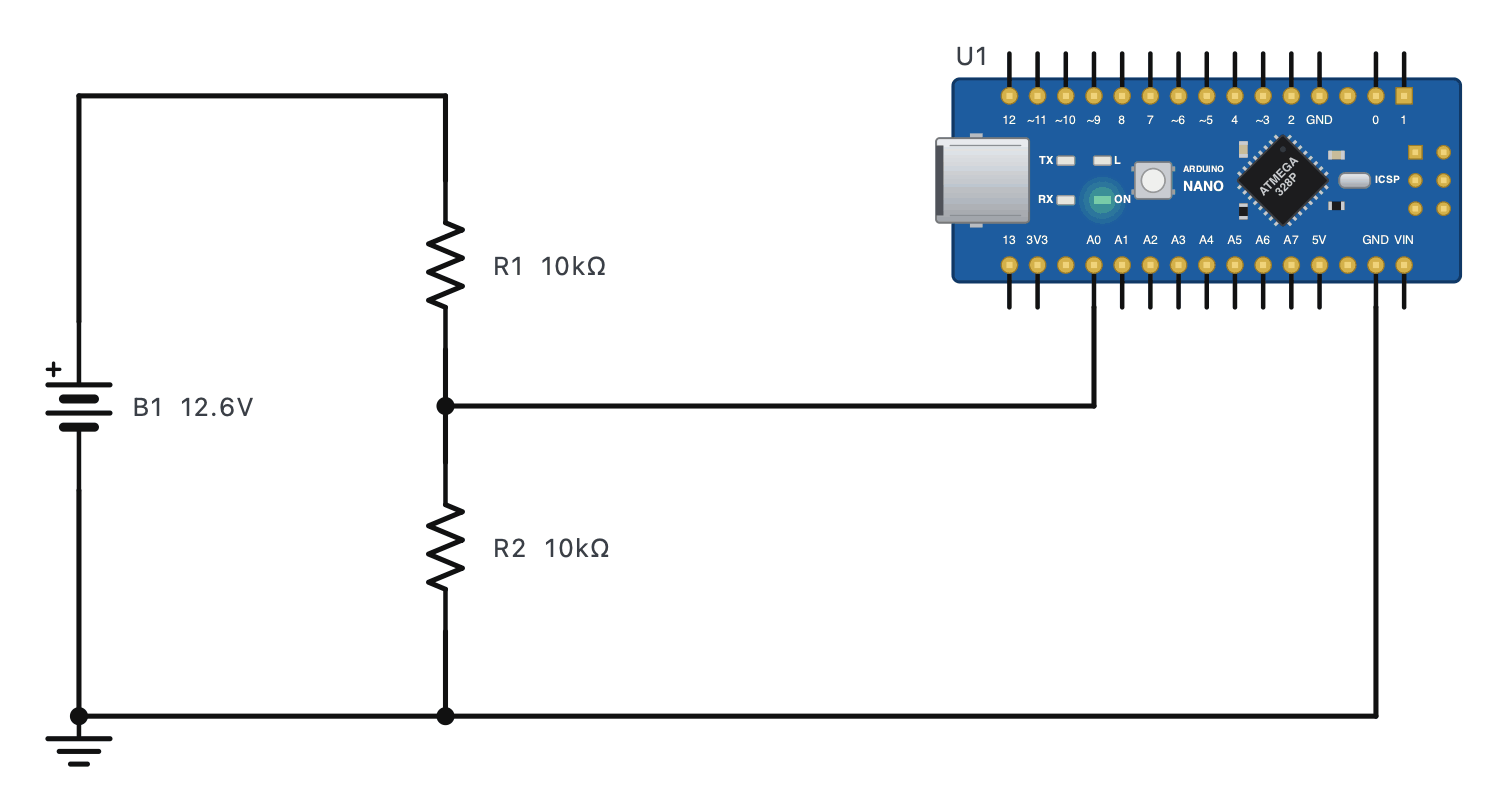
A solar home system's 12 V lead-acid battery must be watched by an Arduino Nano, whose analog input A0 reads 0 - 5 V (0 - 1023). The battery is 12.6 V when full, 14.4 V while charging and should never be run below about 11.9 V. The Nano's sketch (double-click the board) is already written for a 22 kΩ over 10 kΩ divider and prints the battery voltage on the Serial Monitor - but the circuit on the bench was built with 10 kΩ over 10 kΩ. Find the problem, fix it, and test the monitor across the battery's whole range.
The steps
- Press RUN, then double-click the Nano and choose Open the editor: its Serial Monitor tab shows what the sketch prints - "A0 = 1023, battery = 16.00 V". Impossible for a 12.6 V battery.1023 is the largest number the 10-bit ADC can give: the input is at or above 5 V.
- Find out why: measure the voltage at A0 - the multimeter on V⎓ across R2. It reads 6.3 V: half of 12.6 V, more than the 5 V the input can read (and more than it is designed to take). The ADC is stuck at full scale.A0 is wired to the middle of the divider: R2's top end.
- Fix the hardware to match the design: change R1 to 22k. A0 now sees 12.6 × 10 / 32 = 3.94 V (reading about 806), and the Serial Monitor shows the battery at about 12.6 V.Double-click R1 and type 22k. The sketch's (R1 + R2) / R2 = 3.2 now matches the circuit.
- Test the top of the range - the battery charging at 14.4 V (double-click B1). A0 gets 4.5 V (about 921): still safely under 5 V, and the monitor reads 14.4 V.Set B1's voltage to 14.4.
- And the bottom: a flat battery at 11.0 V. A0 gets 3.44 V (about 703) and the monitor reads 11.0 V - time for the controller to disconnect the loads.Set B1's voltage to 11.